Backseat Rally Weekend Showdown and Tournament Guide

Last updated:

Find the Weekend Tournament sign-up entry or join an active Weekend Showdown. For Showdown, follow the event banner, confirm your scoring class, and compete for that class’s gloves.

For Weekend Tournament, use N / READ MORE or U / SIGN UP on the main-menu event card. For Weekend Showdown, use the active banner’s TRAVEL entry, stop in the advertised stage’s start box, check the class-counting message, and press Enter / START STAGE. Open STANDINGS to follow your position. At Sakura Pass, each class’s top five for the hour win the corresponding gloves if they do not already own them.

View game artwork
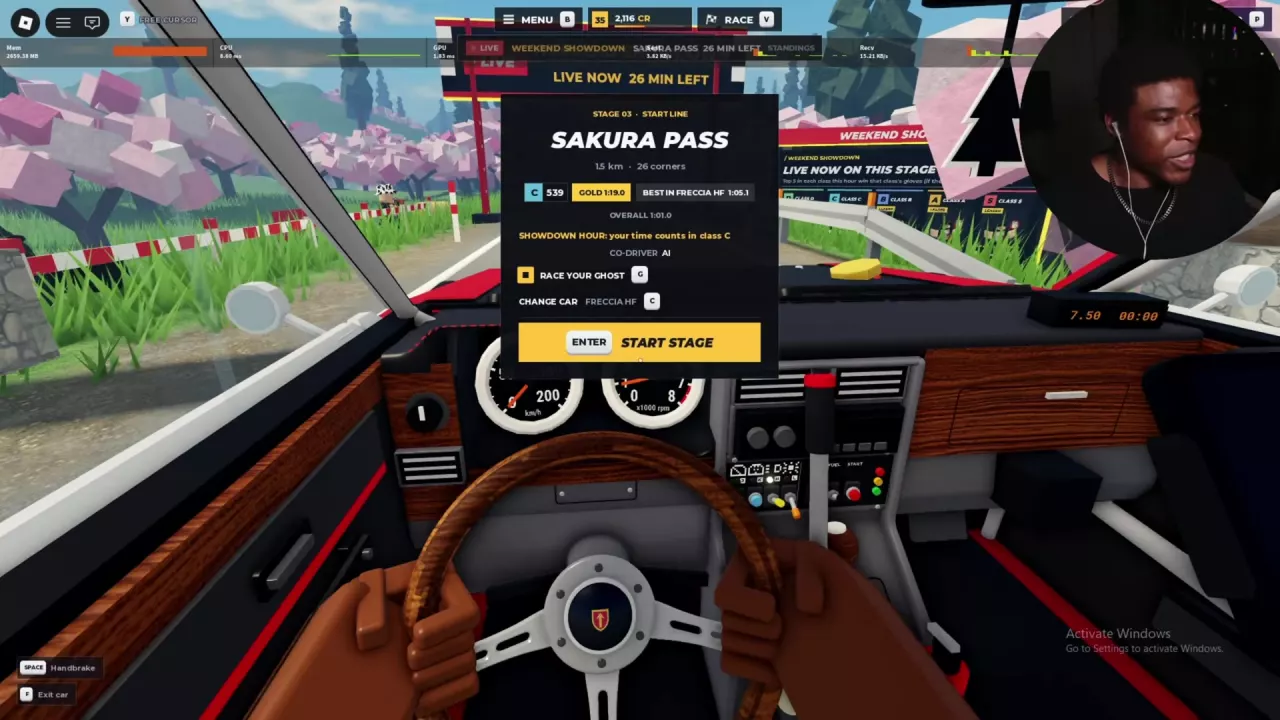
Sakura Pass starting menu assigning the Freccia HF C 539 configuration to class C.

Weekend Tournament: Read More and Sign Up

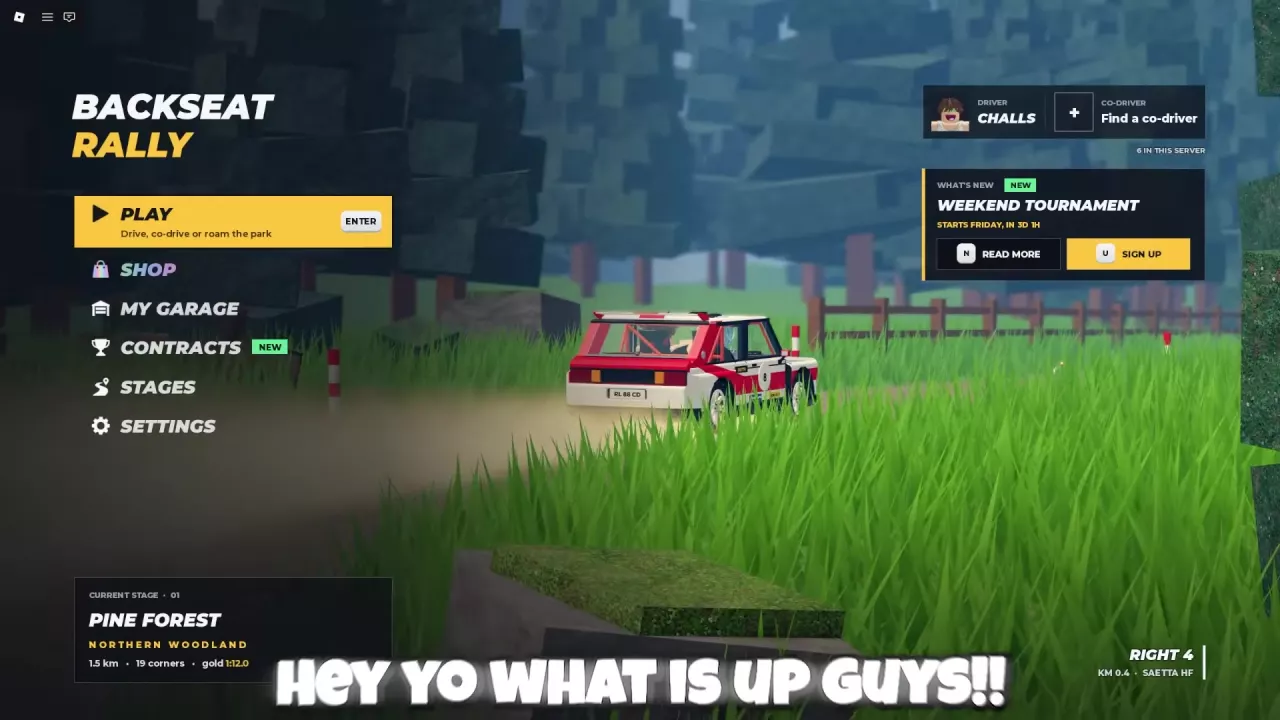
Find the WEEKEND TOURNAMENT card on the main menu.

  • Press N / READ MORE to open the event information.
  • Press U / SIGN UP to open the registration entry.

The UPD + Weekend Tournament offer advertises exclusive gloves for winning. Use the card’s event information for Tournament details; the Showdown Hour rules below apply to Weekend Showdown.

Main menu with the Weekend Tournament card and Read More and Sign Up controls.

Travel to the Active Showdown Stage

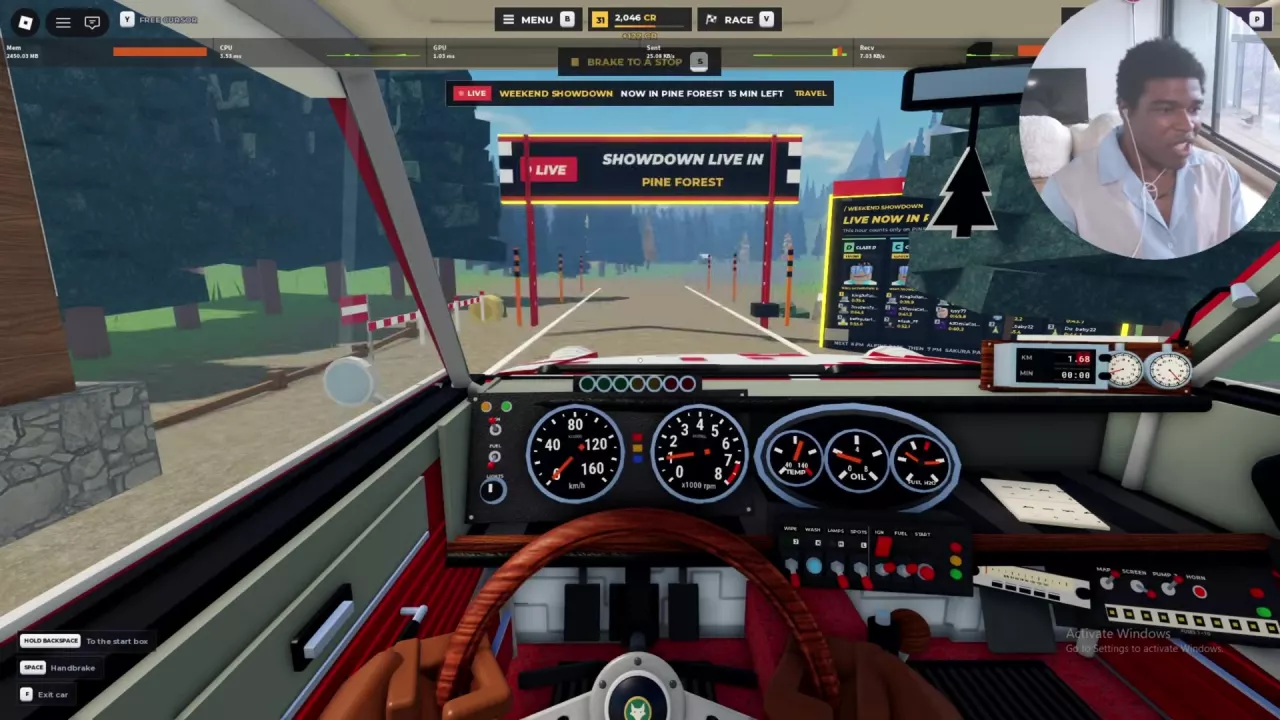
  1. Read the WEEKEND SHOWDOWN banner for the active stage and remaining time.
  2. Select TRAVEL to reach the advertised stage.
  3. Drive into its start box and stop to bring up the starting menu.
  4. Check the SHOWDOWN HOUR message for your scoring class, then press Enter / START STAGE to begin the attempt.

Showdown sessions can take place at Pine Forest, Alpine Pass, or Sakura Pass. Follow the active banner’s location rather than returning to the same course every time. Traveling gets you to the stage; you still need to start the timed run.

If you need help getting the starting menu to appear, follow the stage-start instructions.

Weekend Showdown banner naming Pine Forest and offering Travel.

Check Which Class Counts Your Run

Read the starting menu’s “your time counts in class…” message. It identifies the Showdown group for your current configuration.

Car configuration Event stage Class counting the run
Freccia HF — C 539 Sakura Pass C
Brenner S1 — A 830 Alpine Pass A

Freccia HF also has a separate D 367 configuration. Its model name alone does not determine its Showdown class: the C 539 setup enters class C. Recheck the starting-menu message when you change configurations so you know which standings to follow.

Use C / CHANGE CAR from the starting menu if you want to select another car. The car directory covers vehicle specifications and unlock requirements.

Sakura Pass starting menu assigning the Freccia HF C 539 configuration to class C.

Read Standings and Qualify for Gloves

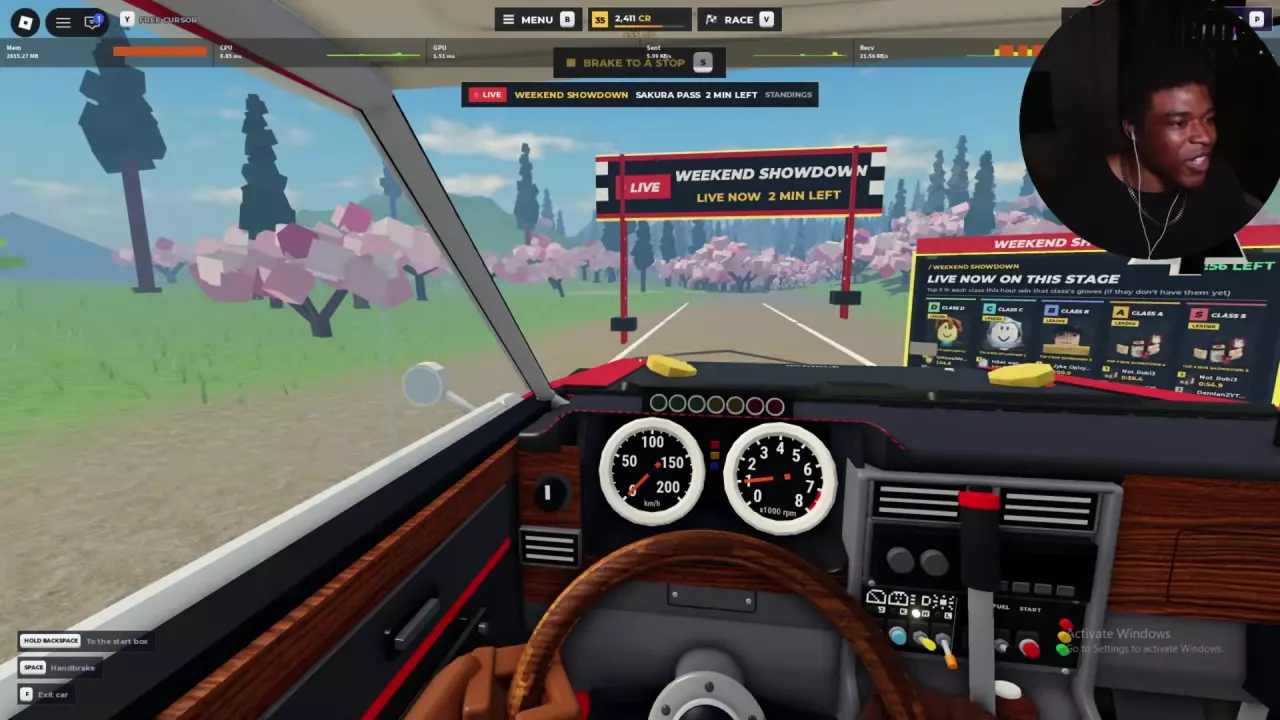
Open STANDINGS from the event banner or inspect the class boards beside the start. At Sakura Pass, the boards separate D, C, B, A, and S entries. Find the class assigned to your current setup and compare your position with its leading times.

At Sakura Pass, G opens STANDINGS while on foot. In the starting menu, G selects RACE YOUR GHOST instead.

Glove reward conditions

Under the Sakura Pass Weekend Showdown rule, each class’s top five for the hour win that class’s gloves if they do not already own them. Being fifth while time remains is a temporary position; the reward depends on the standings for the hour.

SHOWDOWN C and SHOWDOWN D are the corresponding C- and D-class glove styles. Browse their entries below, or use the glove collection and equip guide to manage an unlocked pair.

  • Showdown C

    Appearance
    Black driving gloves with yellow markings.
  • Showdown D

    Appearance
    Black driving gloves with a yellow square marking.

Sakura Pass Showdown boards with class columns and the hourly glove reward conditions.

Prepare Your Next Attempt

With a limited event window, prioritize a completed attempt before spending the remaining time refining your pace.

  • Check your class’s standings after finishing. Use the times in your assigned group to judge how much you need to improve.
  • Use your personal ghost as a pace reference. Follow the ghosts and replays guide for ghost controls, best times, and sector-gap comparisons.
  • Review the active route before another attempt. The stage guide explains route differences and useful driving cues.

Pine Forest’s ordinary weekly board is separate from the Showdown Hour standings. Use the event standings for the hourly glove competition; the weekly-board information covers the regular board.

Find your next answer

Backseat Rally Cars: Stats, Unlock Levels and Garage GuideBest Free Cars in Backseat Rally for Early ProgressionBackseat Rally Car Mastery and the Performance Parts Menu
Best Free Cars in Backseat Rally for Early ProgressionBackseat Rally Cars: Stats, Unlock Levels and Garage Guide
Backseat Rally Keyboard Controls, Tutorial and Driving BasicsBackseat Rally Driving Settings: Handling, Assists and Calls
Backseat Rally Driving Settings: Handling, Assists and Calls
Backseat Rally Co-driver Guide: Roles and Turn CallsBackseat Rally Stages: All Five Routes and Weekly BoardsBackseat Rally Keyboard Controls, Tutorial and Driving Basics
Backseat Rally Co-driver Guide: Roles and Turn CallsHow to Play Backseat Rally with Friends or an AI Co-driver
How to Play Backseat Rally with Friends or an AI Co-driverBackseat Rally Races: Start a Stage and Configure Multiplayer
Backseat Rally Races: Start a Stage and Configure MultiplayerHow to Play Backseat Rally with Friends or an AI Co-driver
Backseat Rally Races: Start a Stage and Configure MultiplayerBackseat Rally Race Your Ghost: Best Times, Sectors and ReplaysBackseat Rally Stages: All Five Routes and Weekly BoardsBackseat Rally Gold Medal Times and Time Gap CalculatorBackseat Rally Weekend Showdown and Tournament Guide
Backseat Rally Stages: All Five Routes and Weekly BoardsBackseat Rally Gold Medal Times and Time Gap CalculatorBackseat Rally Race Your Ghost: Best Times, Sectors and Replays
Backseat Rally Gold Medal Times and Time Gap CalculatorBackseat Rally Air Fresheners: Collection, Rewards and Equipping
Backseat Rally Stages: All Five Routes and Weekly Boards
Backseat Rally Races: Start a Stage and Configure MultiplayerBackseat Rally Keyboard Controls, Tutorial and Driving Basics
How to Get CR and XP in Backseat RallyBackseat Rally Crates: Prices, Odds, Picks and Budget CalculatorBackseat Rally Rewards Calculator: Add CR and XP
Backseat Rally XP Goal Calculator and Account LevelsBackseat Rally Cars: Stats, Unlock Levels and Garage GuideHow to Get CR and XP in Backseat Rally
Backseat Rally Car Mastery and the Performance Parts Menu
Backseat Rally Crates: Prices, Odds, Picks and Budget CalculatorBackseat Rally Car Mastery and the Performance Parts Menu
Backseat Rally Weekly Contracts: Objectives, Tracking and RewardsHow to Get CR and XP in Backseat Rally
How to Get CR and XP in Backseat Rally
Backseat Rally Crates: Prices, Odds, Picks and Budget CalculatorBackseat Rally Tyres, Rims and Gloves: Options and Garage MenusBackseat Rally Game Passes: VIP, Starter Pack and Orkan 9S
Backseat Rally Paint and Liveries: Packs and Equip Controls
Backseat Rally Crates: Prices, Odds, Picks and Budget CalculatorBackseat Rally Game Passes: VIP, Starter Pack and Orkan 9SBackseat Rally Tyres, Rims and Gloves: Options and Garage Menus
Backseat Rally Tyres, Rims and Gloves: Options and Garage MenusBackseat Rally Crates: Prices, Odds, Picks and Budget Calculator
Backseat Rally Air Fresheners: Collection, Rewards and Equipping
Backseat Rally Gloves: Collection, Sources and Equip GuideBackseat Rally Crates: Prices, Odds, Picks and Budget CalculatorBackseat Rally Weekend Showdown and Tournament Guide
Backseat Rally Game Passes: VIP, Starter Pack and Orkan 9SBackseat Rally Paint and Liveries: Packs and Equip Controls
Backseat Rally Rewards Calculator: Add CR and XPBackseat Rally Crates: Prices, Odds, Picks and Budget CalculatorBackseat Rally XP Goal Calculator and Account LevelsBackseat Rally Gold Medal Times and Time Gap Calculator
Backseat Rally Keyboard Controls, Tutorial and Driving BasicsBackseat Rally Driving Settings: Handling, Assists and CallsHow to Play Backseat Rally with Friends or an AI Co-driverBackseat Rally Co-driver Guide: Roles and Turn CallsBackseat Rally Races: Start a Stage and Configure MultiplayerBackseat Rally Stages: All Five Routes and Weekly BoardsHow to Get CR and XP in Backseat RallyBackseat Rally Car Mastery and the Performance Parts MenuBackseat Rally Tyres, Rims and Gloves: Options and Garage MenusBackseat Rally Paint and Liveries: Packs and Equip ControlsBackseat Rally Air Fresheners: Collection, Rewards and EquippingBackseat Rally Game Passes: VIP, Starter Pack and Orkan 9S
Backseat Rally Weekend Showdown and Tournament GuideBackseat Rally Gloves: Collection, Sources and Equip Guide