
Backseat Rally Car Mastery and the Performance Parts Menu

Last updated:

Track the car you want to develop, check its new-part notifications after a stage, and find the Performance entry in Customize.

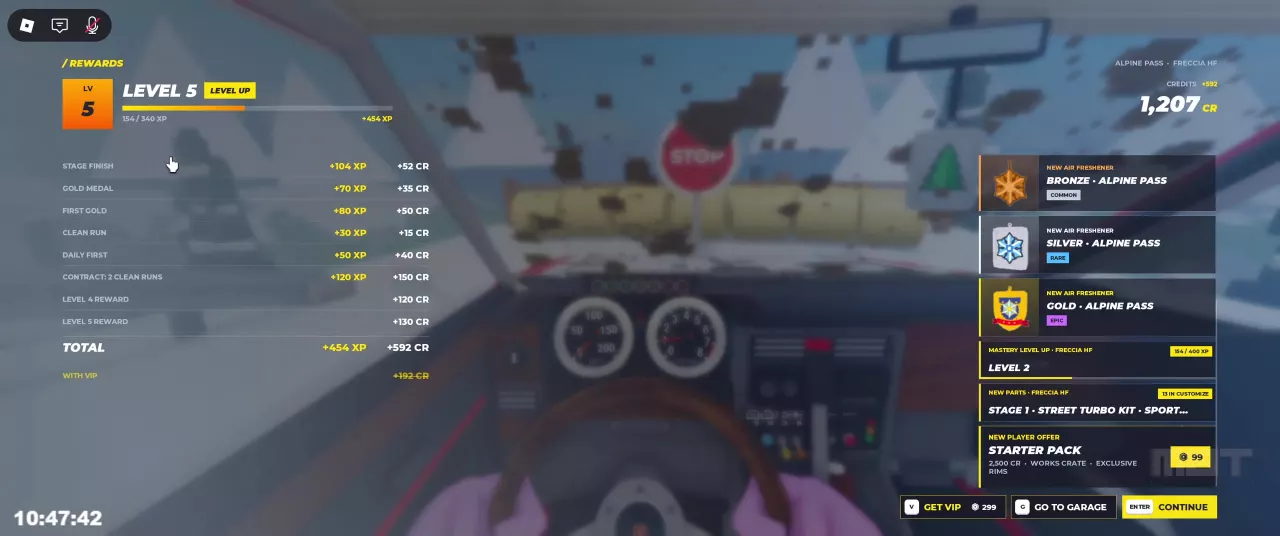
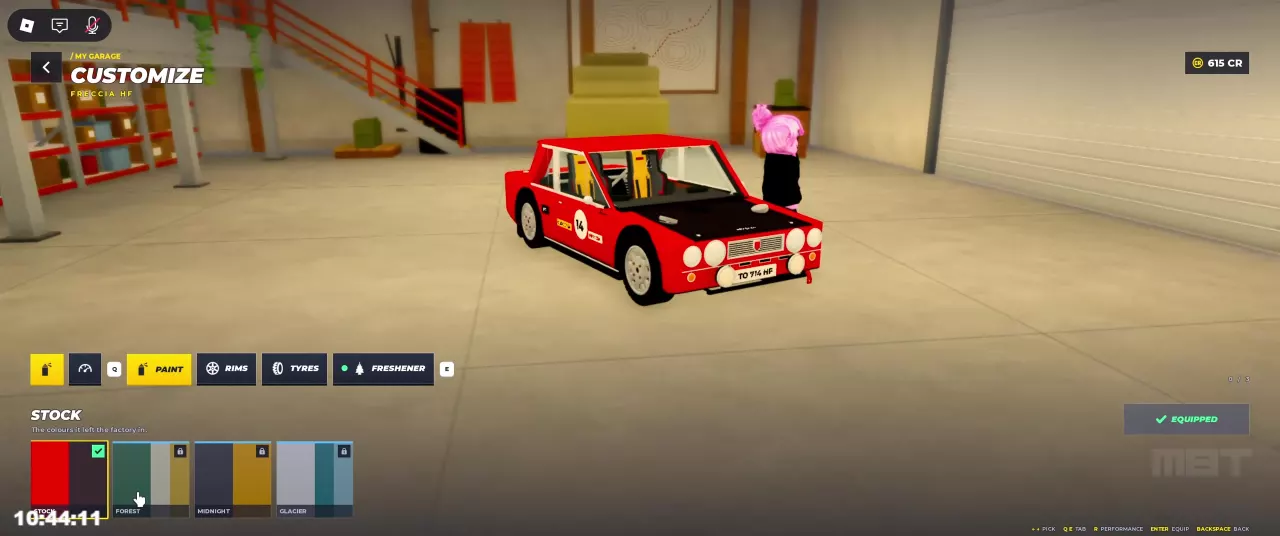
Press C to check the selected car’s mastery in My Garage. Finish a stage in that car, then check the mastery and New Parts panels on Rewards. A Freccia HF Alpine Pass finish reached mastery Level 2 and listed Street Turbo Kit. To find performance parts, go to My Garage → Customize (1) → Performance (R).

View game artwork
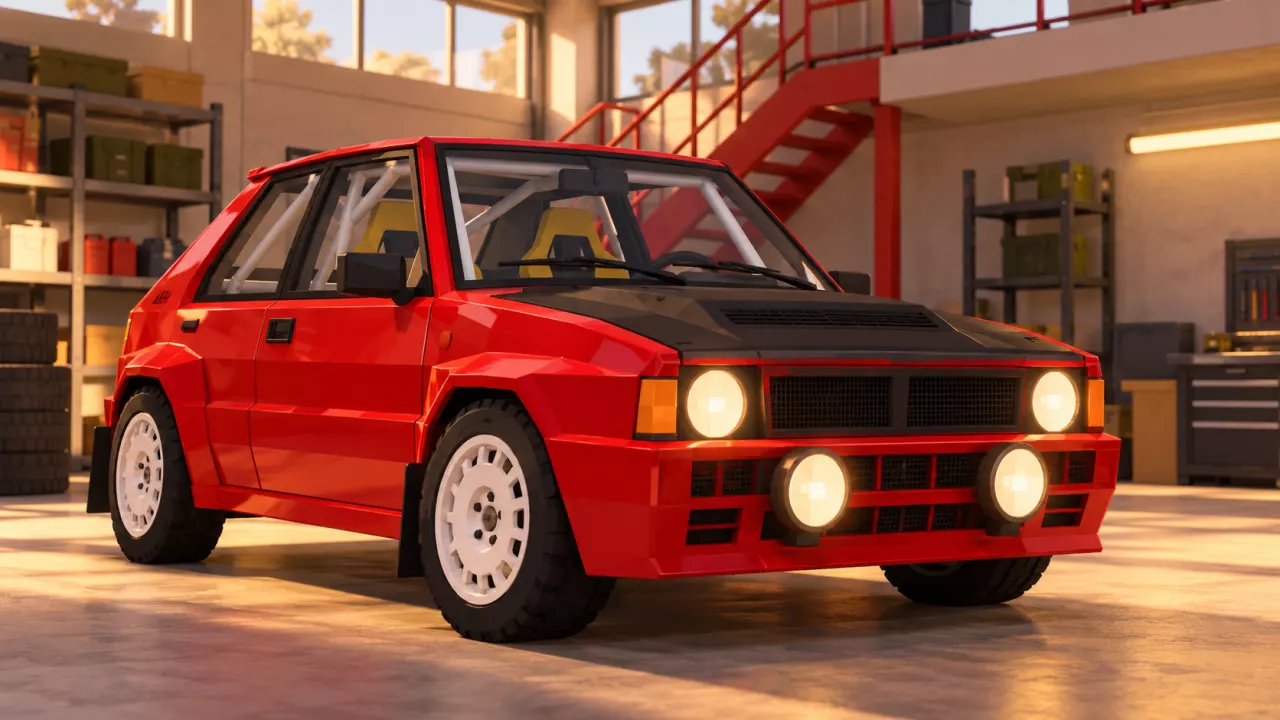
Backseat Rally Car Mastery and the Performance Parts Menu — illustrated cover

Check Mastery for the Selected Car

Press C to open My Garage, then read the mastery badge and XP bar beside the selected car. M1 means mastery Level 1; M2 means mastery Level 2.

Mastery is displayed for each car. For example, switching from an Orso 4 at M2 to a Freccia HF can show the Freccia at M1, 0/300 XP. Check the car’s name before reading its progress; this is separate from your account level.

Choose the car you want to progress before starting your run. For vehicle unlock requirements and the full switching procedure, use the car and garage guide.
Finish a Stage and Check New Parts

  1. Complete a stage in the car whose mastery you want to progress.
  2. On Rewards, find the mastery panel labeled with that car’s name.
  3. Check New Parts beneath it for unlock notifications.

For Freccia HF, an Alpine Pass finish raised mastery to Level 2 and produced a New Parts notification containing Street Turbo Kit. This is the unlock context to look for when checking your Freccia’s mastery rewards.

The mastery panel and New Parts notice sit on the right side of Rewards. The separate CR and account XP payout breakdown is covered in the stage rewards guide.

Rewards screen with Freccia HF mastery Level 2 and a Street Turbo Kit notice on the right.

Open the Performance Menu

  1. Press C to open My Garage. From the post-stage Rewards screen, use G — Go to Garage instead.
  2. Choose Customize, shown with shortcut 1.
  3. Press R for Performance. The shortcut appears along the bottom of the Customize screen.

For appearance options, use the separate tyres, rims and gloves menu guide.

Freccia HF in Customize with the R Performance shortcut along the bottom.

Use Your Current Mastery Bar

Read the first number as XP earned within the current mastery level and the second as the XP target for that level. Subtract the first from the second to find the remaining XP.

For the Freccia HF Level 2 result above, 154/400 XP means 246 mastery XP remaining to the next level. On that same Rewards screen, the account bar reads Level 5, 154/340 XP—use the bar labeled with the car’s name for mastery.

Use the target on your current car’s screen when planning progress. Orso 4’s M1 bar can display 0/300 XP or 0/800 XP; neither denominator should be treated as a universal requirement for every car or level.

For player-level goals and vehicle unlock progression, use the account XP goal calculator.

Find your next answer

Backseat Rally Cars: Stats, Unlock Levels and Garage GuideBest Free Cars in Backseat Rally for Early ProgressionBackseat Rally Car Mastery and the Performance Parts Menu
Best Free Cars in Backseat Rally for Early ProgressionBackseat Rally Cars: Stats, Unlock Levels and Garage Guide
Backseat Rally Keyboard Controls, Tutorial and Driving BasicsBackseat Rally Driving Settings: Handling, Assists and Calls
Backseat Rally Driving Settings: Handling, Assists and Calls
Backseat Rally Co-driver Guide: Roles and Turn CallsBackseat Rally Stages: Pine Forest, Alpine Pass and Weekly BoardsBackseat Rally Keyboard Controls, Tutorial and Driving Basics
Backseat Rally Co-driver Guide: Roles and Turn CallsHow to Play Backseat Rally with Friends or an AI Co-driver
How to Play Backseat Rally with Friends or an AI Co-driverBackseat Rally Races: Start a Stage and Configure Multiplayer
Backseat Rally Races: Start a Stage and Configure MultiplayerHow to Play Backseat Rally with Friends or an AI Co-driver
Backseat Rally Races: Start a Stage and Configure MultiplayerBackseat Rally Stages: Pine Forest, Alpine Pass and Weekly BoardsBackseat Rally Gold Medal Times and Time Gap Calculator
Backseat Rally Stages: Pine Forest, Alpine Pass and Weekly BoardsBackseat Rally Gold Medal Times and Time Gap Calculator
Backseat Rally Gold Medal Times and Time Gap CalculatorBackseat Rally Air Fresheners: Collection, Rewards and Equipping
Backseat Rally Stages: Pine Forest, Alpine Pass and Weekly Boards
Backseat Rally Races: Start a Stage and Configure MultiplayerBackseat Rally Keyboard Controls, Tutorial and Driving Basics
How to Get CR and XP in Backseat RallyBackseat Rally Crates: Prices, Odds, Picks and Budget CalculatorBackseat Rally Rewards Calculator: Add CR and XP
Backseat Rally XP Goal Calculator and Account LevelsBackseat Rally Cars: Stats, Unlock Levels and Garage GuideHow to Get CR and XP in Backseat Rally
Backseat Rally Car Mastery and the Performance Parts Menu
How to Get CR and XP in Backseat Rally
Backseat Rally Crates: Prices, Odds, Picks and Budget CalculatorBackseat Rally Tyres, Rims and Gloves: Options and Garage MenusBackseat Rally Game Passes: VIP, Starter Pack and Orkan 9S
Backseat Rally Paint and Liveries: Packs and Equip Controls
Backseat Rally Crates: Prices, Odds, Picks and Budget CalculatorBackseat Rally Game Passes: VIP, Starter Pack and Orkan 9SBackseat Rally Tyres, Rims and Gloves: Options and Garage Menus
Backseat Rally Tyres, Rims and Gloves: Options and Garage MenusBackseat Rally Crates: Prices, Odds, Picks and Budget Calculator
Backseat Rally Air Fresheners: Collection, Rewards and Equipping
Backseat Rally Crates: Prices, Odds, Picks and Budget CalculatorBackseat Rally Tyres, Rims and Gloves: Options and Garage Menus
Backseat Rally Game Passes: VIP, Starter Pack and Orkan 9SBackseat Rally Paint and Liveries: Packs and Equip Controls
Backseat Rally Rewards Calculator: Add CR and XPBackseat Rally Crates: Prices, Odds, Picks and Budget CalculatorBackseat Rally XP Goal Calculator and Account LevelsBackseat Rally Gold Medal Times and Time Gap Calculator
Backseat Rally Keyboard Controls, Tutorial and Driving BasicsBackseat Rally Driving Settings: Handling, Assists and CallsHow to Play Backseat Rally with Friends or an AI Co-driverBackseat Rally Co-driver Guide: Roles and Turn CallsBackseat Rally Races: Start a Stage and Configure MultiplayerBackseat Rally Stages: Pine Forest, Alpine Pass and Weekly BoardsHow to Get CR and XP in Backseat RallyBackseat Rally Car Mastery and the Performance Parts MenuBackseat Rally Tyres, Rims and Gloves: Options and Garage MenusBackseat Rally Paint and Liveries: Packs and Equip ControlsBackseat Rally Air Fresheners: Collection, Rewards and EquippingBackseat Rally Game Passes: VIP, Starter Pack and Orkan 9S