The player's roadbook

Backseat Rally Wiki

Last updated:

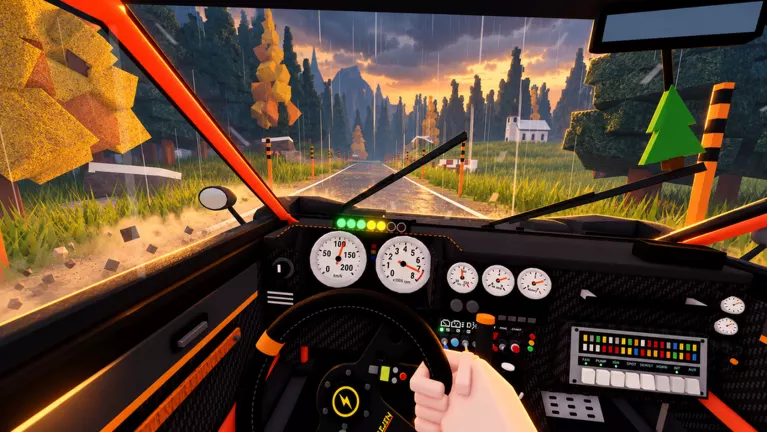
Drive rally stages through forests and snowy mountain roads while a friend calls the turns, or take the wheel with an AI co-driver. Chase medals, improve your times, or race other players.

Backseat Rally official artwork

Start Your First Stage

  1. Choose your role and car. To drive, press C for My Garage and select the starting Orso 4 or another unlocked car through Change Car. To navigate for someone else, choose Play → Co-drive, then accept a driver's invitation or press E beside a car showing the Co-drive prompt.
  2. Set up your co-driver. After selecting a car, continue to CO-DRIVER. INVITE lets you choose a server player and use Spawn + invite; they must accept. AI CO-DRIVER lets you drive solo with an AI navigator. LEAVE SEAT OPEN welcomes another player into the passenger seat. The co-driver setup guide covers each option.
  3. Start the stage. Use the displayed spawn action or Drive to bring out your car. Stop inside the start box, press Enter when START STAGE appears, and wait for GO. See start-box help if you miss the starting area.
  4. Finish and check rewards. Complete the route to reach the replay and results. Enter skips the replay; the final rewards screen offers G to return to the garage.
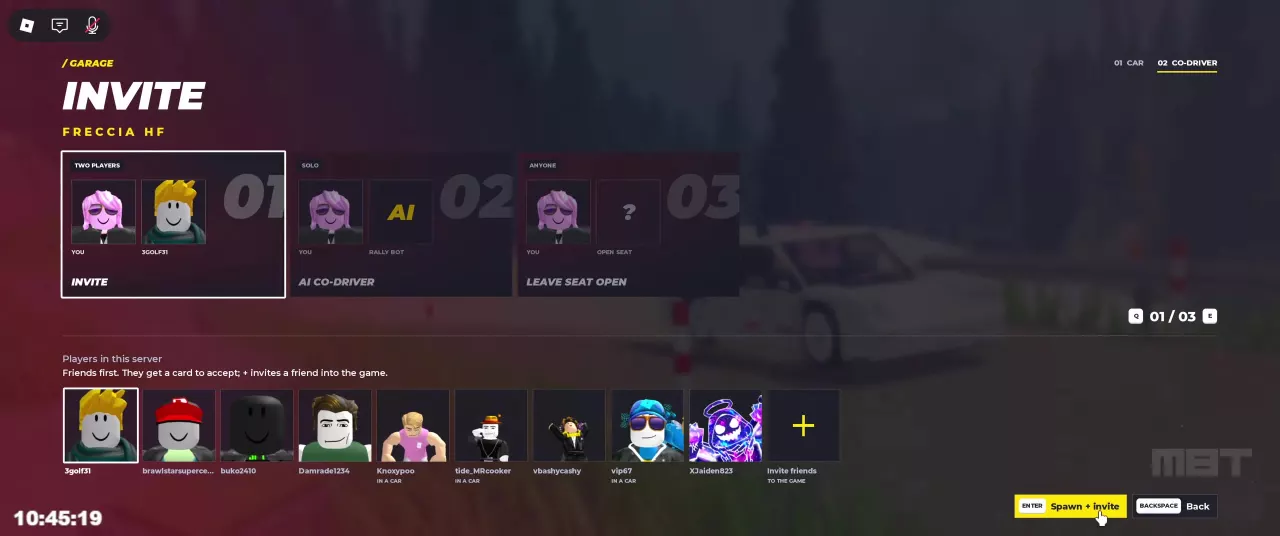
Co-driver setup with Invite, AI Co-driver, and Leave Seat Open options.

Cars and Unlocks

Finish stages to earn account XP and reach vehicle unlock levels. Some cars also offer Unlock Now for an early Robux purchase.

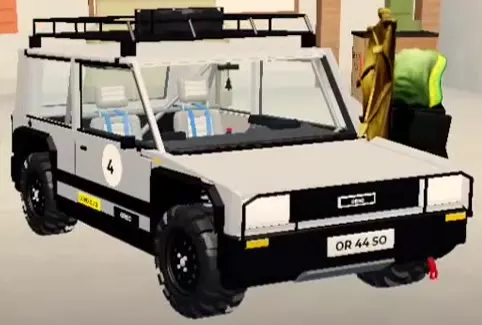
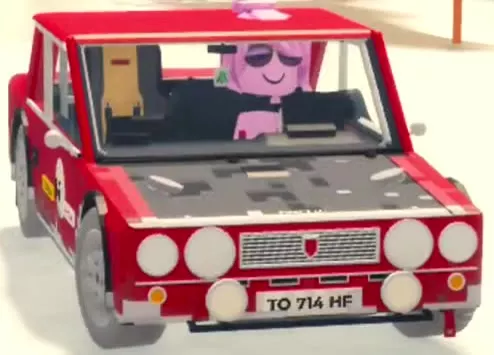
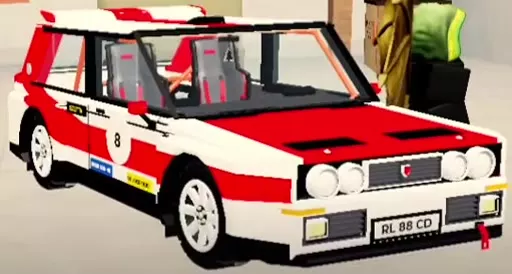
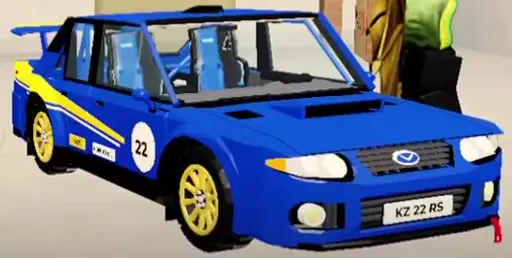
Consider Freccia HF for your first level-based upgrade, Saetta HF if you want an early AWD option, or Kaze RS for a later B-class choice with stronger listed specifications. The early car picks guide compares these choices with same-class alternatives.

  • White Orso 4 with large tires, a roof rack and black bumpers.

    Orso 4

    Class
    D
    Unlock
    Available from the start
    Drivetrain
    RWD
    Listed top speed
    149 km/h
  • Red Freccia HF with a dark hood and round auxiliary lamps.

    Freccia HF

    Class
    D
    Unlock level
    3 player level
    Drivetrain
    FWD
    Listed top speed
    177 km/h
  • Red and white Saetta HF rally hatchback with door number 8.

    Saetta HF

    Class
    C
    Unlock level
    6 player level
    Drivetrain
    AWD
    Listed top speed
    175 km/h
  • Blue Kaze RS with yellow graphics, gold wheels and door number 22.

    Kaze RS

    Class
    B
    Unlock level
    10 player level
    Drivetrain
    AWD
    Listed top speed
    191 km/h
All cars and unlock requirements

Stages and Gold Targets

Use STAGES in the main menu to travel to another stage. At Pine Forest's Service Park entrance, the Start gantry is ahead and Garage is on the right. Alpine Pass takes you from wooded mountain roads into snow.

Gold targets

Use the target on your current stage panel. Alpine Pass shows 1:23.5; Pine Forest can show 1:12.0 or 1:20, so use the value displayed in your session.

The time-gap calculator compares your result with that target. Add separate penalties only when your entered time excludes them. See gold targets and time-gap guidance for medal rewards and interpreting the comparison.

NameLengthCornersTerrain
Pine Forest
1.5 km
19
Forest dirt roads; windshield mud
Alpine Pass
1.6 km
20
Wooded mountain roads into snow
Stage details and locations

Backseat Rally Gold Medal Times and Time Gap Calculator

Compare a user-entered stage time with the current target, adding separate penalties only when needed.

Comparison time = entered time + separate penalties if the entered time excludes them. Gap = comparison time − target time.

  • Enter both times in seconds; convert minutes using 60 × minutes + seconds.
  • Use the target shown on your current stage panel.
  • A positive gap is time to save; a negative gap is the margin below the target.
  • The result compares displayed numbers and does not determine the game's medal boundary.
  • Initial values are editable examples, not stage presets.

Driving, Turn Calls and Recovery

Basic controls

  • W: Accelerate.
  • A / D: Steer left or right.
  • S: Brake; keep holding after stopping to reverse.
  • Space: Apply the handbrake.

If Driver Basics stops advancing, complete the input it requests. The controls and tutorial guide explains the individual prompts.

Reading turn calls

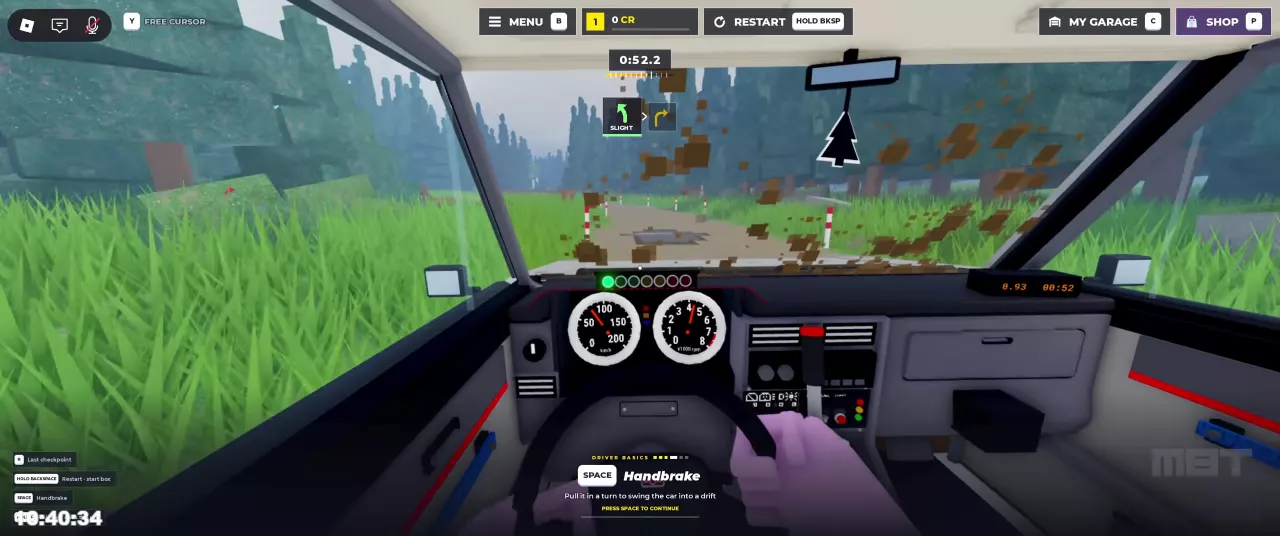
The driver controls the car; the co-driver calls upcoming turns. Read direction and severity together: SLIGHT means a gentle bend, HARD means a sharp bend, and the arrow gives its direction. The co-driver guide explains how to communicate these cues.

Recovering the car

  • Reposition: Stop and hold S to reverse.
  • Return to a checkpoint: Press R during a timed stage.
  • Restart: Hold Backspace to return to the start box.
A SLIGHT left-turn cue followed by a right arrow above the forest road.

Handling and Audio Settings

Open Settings → Driving to choose:

  • Handling — Arcade / Sim: Arcade adds drift assistance, slight road-keeping steering assistance, and bouncier jumps. Choose it if you want those assists.
  • Brake assist — Auto / On / Off: Choose Off to disable brake assistance.
  • Co-driver calls — Simple / Full: Select your call style here.

For spoken coordination, enable sound and voice chat; raise voice volume in settings if it is set to zero. The dashboard radio has a separate Turn on radio interaction.

Full driving and audio settings guide

Multiplayer Races and Weekly Boards

Race other players

Press V to open RACES. Hosts can set:

  • Who can join: Everyone, Friends, or Invite only.
  • Collisions: Off or On.
  • Participants: 2–6.
  • Class: Any, D, C, B, A, S, or Stock.

Use HOST RACE after choosing settings, or check the same menu for available races to join. The multiplayer race guide covers configuration.

Find the weekly boards

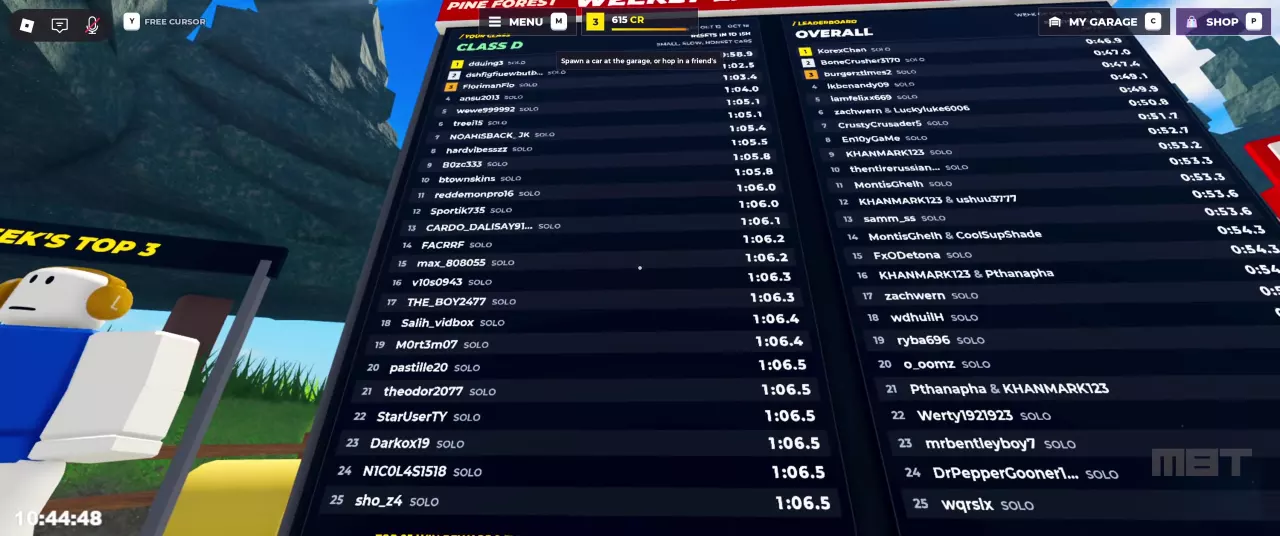
Look near the stage entrance in Pine Forest's service park for Pine Forest Weekly. The boards show Class D and Overall times, with SOLO labels or paired player names; a nearby display highlights the week's top three. See Pine Forest locations for orientation.

Your own best time appears in the main menu's stage information.

Pine Forest Weekly boards showing Class D and Overall standings.

CR, Contracts and Daily First

Stage earnings

Finishing stages earns CR and account XP. Medal, First Gold, and Clean Run bonuses can add rewards when earned. Spend CR on crates in the garage.

Contracts

Open Contracts in the main menu and check the stage start panel for an objective and progress. Finish Pine Forest twice is a stage-specific objective; 2 Clean Runs is a different contract, with its payout separate from an individual Clean Run bonus.

Daily First

Check the post-stage breakdown for Daily First. Use the reward calculator to add the rows you actually received.

Full CR, XP and reward breakdown

Account Levels and Car Mastery

Account levels

Account XP raises your player level and helps meet vehicle unlock requirements. Check your account XP bar for the next level; use account XP goals to estimate progress toward a target.

Car mastery

Mastery tracks the selected car separately. Check it in My Garage or after finishing a stage in that car. For example, one Alpine Pass result shows account Level 5, 154/340 XP, alongside Freccia HF mastery Level 2, 154/400 XP.

Performance parts

In that Freccia HF result, reaching mastery Level 2 produced a New Parts notice containing Street Turbo Kit. To reach the parts menu, press C → Customize → R: Performance. The mastery and Performance guide covers these progress displays and the menu entry.

Crate Choices and Guarantees

Open My Garage with C → Crates (4). CR and Robux are alternative ways to purchase a crate.

  • Clubman: Lowest purchase cost; includes rims, road tires, and gloves.
  • Wheel: For rally rims and tires; excludes gloves.
  • Works: Highest listed Epic and Legendary chances per crate.

Guarantees and duplicates

  • Epic guarantee: After 12 crates without an Epic, the next crate guarantees Epic or better. A card's countdown shows its current progress toward that guarantee.
  • Duplicate compensation: Common converts to 50 CR, Rare to 125 CR, Epic to 350 CR, and Legendary to 900 CR.
  • Green Clubman Crate with metal corners and white markings.

    Clubman Crate

    Credit price
    600 CR
    Robux price
    49 Robux
    Epic item chance
    8.5%
    Legendary item chance
    1.5%
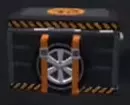
  • Black Wheel Crate with orange straps and a wheel on the front.

    Wheel Crate

    Credit price
    1K CR
    Robux price
    79 Robux
    Epic item chance
    13.5%
    Legendary item chance
    3.5%
  • Red Works Crate with yellow stripes and a silver frame.

    Works Crate

    Credit price
    1,500 CR
    Robux price
    119 Robux
    Epic item chance
    17%
    Legendary item chance
    5%
All crate odds, rules and budget calculator

Paint, Tyres, Rims and Gloves

Open C → Customize (1) for Paint, Rims, and Tyres. Choose an unlocked appearance in its category and press Enter to equip it.

Paint styles

Each pack includes three liveries usable on every car:

  • Prestige: Premium styles, including Sovereign.
  • Volt: Bold modern styles, including Shockwave.
  • Classics: Classic rally styles, including Forest.

Compare the full sets in the paint and livery directory.

Tires, rims, and gloves

Blue Stripe and Whitewall are named options in the Tyres category. Browse the tire directory and accessory guide for the available designs and menus.

  • Rims: Managed under Customize → Rims; sources include crates and Starter Pack's exclusive rims.
  • Gloves: Managed through My Garage → Driver (3); Clubman Crates include gloves.

Air Fresheners

Medal rewards

An Alpine Pass gold-medal finish awarded three Snowflake fresheners together: Bronze — Common, Silver — Rare, and Gold — Epic.

Equip a freshener

Open Customize → Freshener, select an unlocked item, then confirm with Equip or Enter.

All air fresheners and equip instructions

Game Pass Choices

Starter Pack — immediate resources

Listed at 99 Robux, this one-time bundle includes 2,500 CR, one Works Crate, and exclusive rims. Choose it if you want resources right away.

VIP — repeated stage finishes

Listed at 299 Robux, VIP permanently doubles credits from completed stages. It fits players who regularly finish runs.

Orkan 9S — a specific car

Listed at 695 Robux, the pass permanently unlocks Orkan 9S for every stage. Choose it if that vehicle is the purchase you want.

Full game pass benefits and comparisons

Frequently asked questions

Can I play solo, and who drives?

Yes. Choose AI CO-DRIVER on the garage's CO-DRIVER page. You drive while the AI navigates beside you. See solo and friend setup.

Why does the start panel say AI after I invite a friend?

It can show AI while the human invitation is pending. Your friend must accept the invitation card; look for the notification confirming them as your co-driver.

Why is Driver Basics stuck on Brake?

Hold S when HOLD S TO CONTINUE appears. Passing checkpoints does not complete the required braking input. Keep in mind that continuing to hold S after stopping makes the car reverse.

Are account level and car mastery the same?

No. Account level is used for vehicle unlock requirements; mastery tracks the selected car and can unlock parts. Each has its own XP bar. See car mastery for where to check it.

Why hasn't my selected air freshener equipped?

Selecting it only previews it. For an unlocked freshener, press Enter or choose Equip, then check for the green check and Equipped label. See freshener equipping.

Codes

CodeReward & detailsStatusCopy
RELEASE

250 Credits

Reported active

Find your next answer

Backseat Rally Cars: Stats, Unlock Levels and Garage GuideBest Free Cars in Backseat Rally for Early ProgressionBackseat Rally Car Mastery and the Performance Parts Menu
Best Free Cars in Backseat Rally for Early ProgressionBackseat Rally Cars: Stats, Unlock Levels and Garage Guide
Backseat Rally Keyboard Controls, Tutorial and Driving BasicsBackseat Rally Driving Settings: Handling, Assists and Calls
Backseat Rally Driving Settings: Handling, Assists and Calls
Backseat Rally Co-driver Guide: Roles and Turn CallsBackseat Rally Stages: Pine Forest, Alpine Pass and Weekly BoardsBackseat Rally Keyboard Controls, Tutorial and Driving Basics
Backseat Rally Co-driver Guide: Roles and Turn CallsHow to Play Backseat Rally with Friends or an AI Co-driver
How to Play Backseat Rally with Friends or an AI Co-driverBackseat Rally Races: Start a Stage and Configure Multiplayer
Backseat Rally Races: Start a Stage and Configure MultiplayerHow to Play Backseat Rally with Friends or an AI Co-driver
Backseat Rally Races: Start a Stage and Configure MultiplayerBackseat Rally Stages: Pine Forest, Alpine Pass and Weekly BoardsBackseat Rally Gold Medal Times and Time Gap Calculator
Backseat Rally Stages: Pine Forest, Alpine Pass and Weekly BoardsBackseat Rally Gold Medal Times and Time Gap Calculator
Backseat Rally Gold Medal Times and Time Gap CalculatorBackseat Rally Air Fresheners: Collection, Rewards and Equipping
Backseat Rally Stages: Pine Forest, Alpine Pass and Weekly Boards
Backseat Rally Races: Start a Stage and Configure MultiplayerBackseat Rally Keyboard Controls, Tutorial and Driving Basics
How to Get CR and XP in Backseat RallyBackseat Rally Crates: Prices, Odds, Picks and Budget CalculatorBackseat Rally Rewards Calculator: Add CR and XP
Backseat Rally XP Goal Calculator and Account LevelsBackseat Rally Cars: Stats, Unlock Levels and Garage GuideHow to Get CR and XP in Backseat Rally
Backseat Rally Car Mastery and the Performance Parts Menu
How to Get CR and XP in Backseat Rally
Backseat Rally Crates: Prices, Odds, Picks and Budget CalculatorBackseat Rally Tyres, Rims and Gloves: Options and Garage MenusBackseat Rally Game Passes: VIP, Starter Pack and Orkan 9S
Backseat Rally Paint and Liveries: Packs and Equip Controls
Backseat Rally Crates: Prices, Odds, Picks and Budget CalculatorBackseat Rally Game Passes: VIP, Starter Pack and Orkan 9SBackseat Rally Tyres, Rims and Gloves: Options and Garage Menus
Backseat Rally Tyres, Rims and Gloves: Options and Garage MenusBackseat Rally Crates: Prices, Odds, Picks and Budget Calculator
Backseat Rally Air Fresheners: Collection, Rewards and Equipping
Backseat Rally Crates: Prices, Odds, Picks and Budget CalculatorBackseat Rally Tyres, Rims and Gloves: Options and Garage Menus
Backseat Rally Game Passes: VIP, Starter Pack and Orkan 9SBackseat Rally Paint and Liveries: Packs and Equip Controls
Backseat Rally Rewards Calculator: Add CR and XPBackseat Rally Crates: Prices, Odds, Picks and Budget CalculatorBackseat Rally XP Goal Calculator and Account LevelsBackseat Rally Gold Medal Times and Time Gap Calculator
Backseat Rally Keyboard Controls, Tutorial and Driving BasicsBackseat Rally Driving Settings: Handling, Assists and CallsHow to Play Backseat Rally with Friends or an AI Co-driverBackseat Rally Co-driver Guide: Roles and Turn CallsBackseat Rally Races: Start a Stage and Configure MultiplayerBackseat Rally Stages: Pine Forest, Alpine Pass and Weekly BoardsHow to Get CR and XP in Backseat RallyBackseat Rally Car Mastery and the Performance Parts MenuBackseat Rally Tyres, Rims and Gloves: Options and Garage MenusBackseat Rally Paint and Liveries: Packs and Equip ControlsBackseat Rally Air Fresheners: Collection, Rewards and EquippingBackseat Rally Game Passes: VIP, Starter Pack and Orkan 9S