
Stock
STOCK
- Appearance
- Bare hands; default Driver appearance.
Last updated:
Find a Driver appearance you like, choose between crate and event rewards, and equip your unlocked gloves through My Garage.
Clubman Crates include gloves alongside rims and road tyres; the Glove Crate advertises exclusive gloves for 99 Robux. Showdown C and D are class-specific event rewards. To equip an unlocked appearance, press C for My Garage, choose Driver with 3, select it with Left/Right, and press Enter. EQUIPPED identifies your active appearance.
10 objects
Find Driver appearances by name and compare their appearance and linked reward sources.
STOCK
BLACK
RED
WHITE
BLUE STRIPE
FOREST CAMO
HI-VIS
RACE SUIT
SHOWDOWN C
SHOWDOWN D
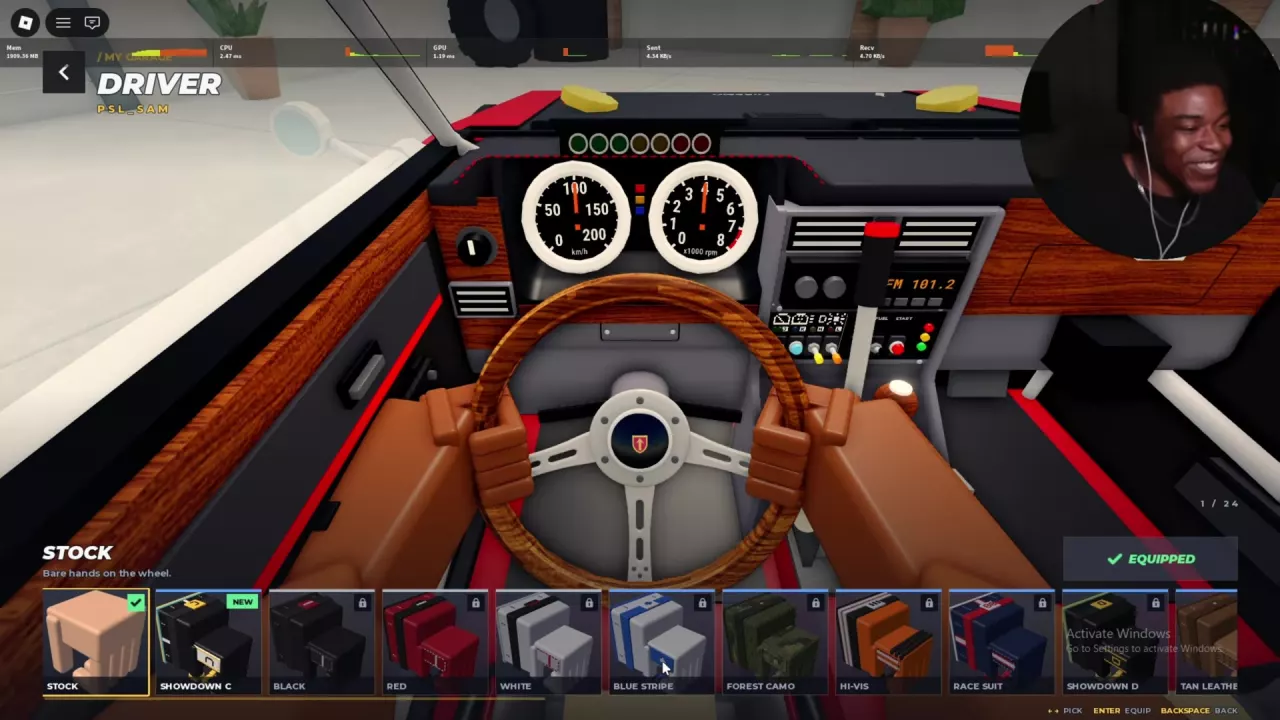
Stock is the default bare-hands appearance. Browse the glove styles below by name and appearance, including the separate Showdown C and Showdown D rewards.
| Crate | Price | Contents relevant to your choice |
|---|---|---|
| Clubman Crate | 600 CR or 49 Robux | Gloves, rims, and road tyres |
| Glove Crate | 99 Robux on the roadside display near the Alpine Pass starting area | Exclusive gloves |
| Wheel Crate | — | Rally rims and tyres; no gloves |
See the crate prices and purchase guide for buying options, rarity odds, and budgeting.
Showdown gloves correspond to the class you compete in:
Under the Sakura Pass Weekend Showdown rule, each class's top five for the hour win that class's gloves if they do not already own them. A position inside the top five while the hour is still running does not secure the reward. Check the starting menu's class designation for your current car configuration so you target the correct reward.
The Weekend Tournament event card separately advertises exclusive gloves for winning. Its advertised reward does not identify a specific Showdown pair. Use the weekend events guide for Tournament entry, Showdown participation, and standings.
The selection frame marks your preview. NEW marks a newly available item; it does not mean you are wearing it. EQUIPPED identifies the active appearance. A lock marks an option you have not unlocked.
To return to bare hands, select Stock and press Enter.
For wheel and tyre appearance menus, see the tyres and rims guide.