Backseat Rally Race Your Ghost: Best Times, Sectors and Replays

Last updated:

Race against your personal ghost to compare progress, then use your best times and Sakura Pass sector results to decide where to focus your next attempt.

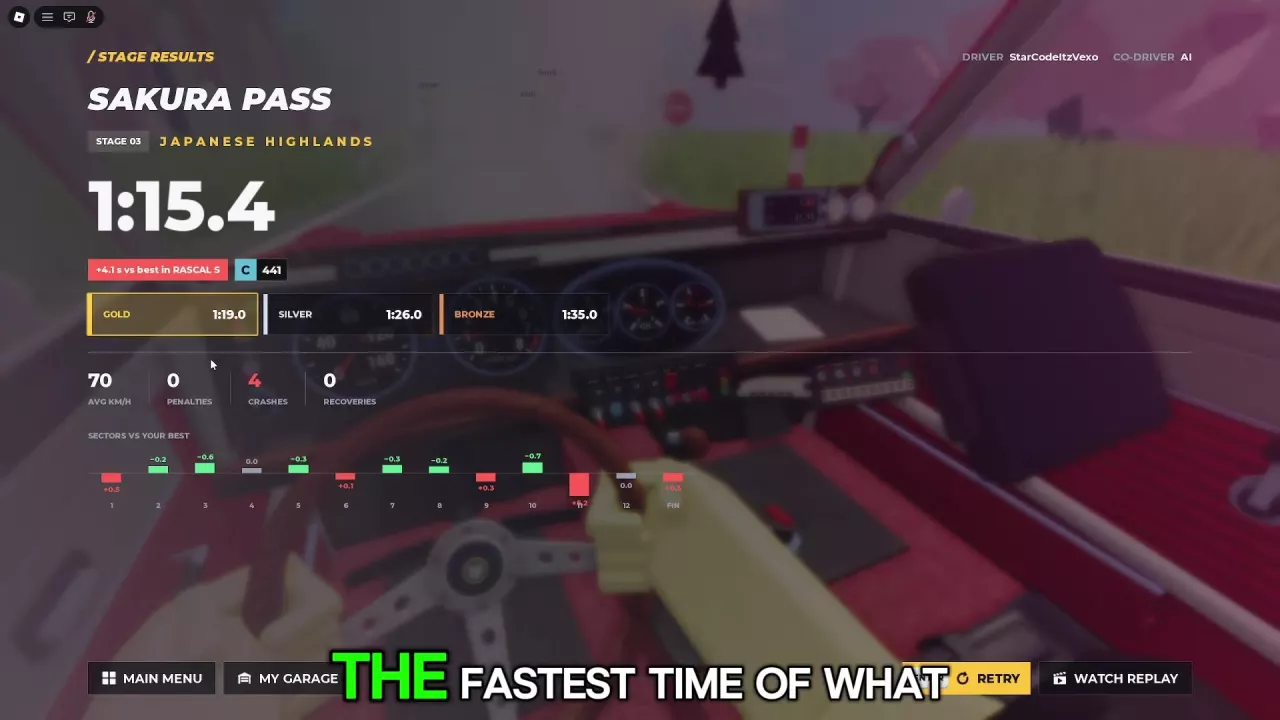
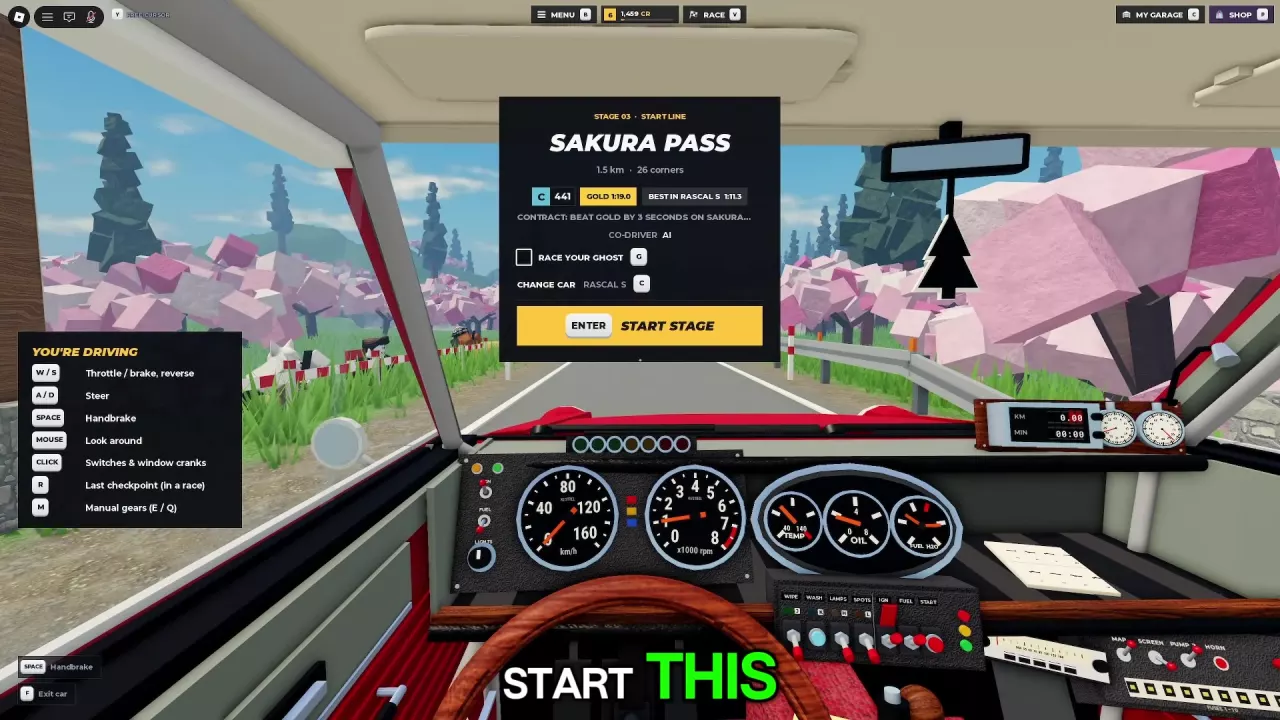
At the Pine Forest, Alpine Pass or Sakura Pass start panel, press G to toggle RACE YOUR GHOST, then Enter to start. On Sakura Pass results, red positive sector gaps mean slower than your best, green negative gaps mean faster, and gray 0.0 means even. Select WATCH REPLAY to review the run or RETRY to try again.

View game artwork
Sakura Pass start panel with the Race Your Ghost checkbox, G shortcut and Enter Start Stage button.

Turn On Race Your Ghost

  1. Stop in the start box at Pine Forest, Alpine Pass or Sakura Pass to open the start panel.
  2. Press G to toggle RACE YOUR GHOST. Check the box to enable it before starting.
  3. Press Enter for START STAGE, then wait for the countdown and GO.

If the panel says NO GHOST YET, no ghost is currently available for that attempt. You can still start the stage normally.

If you cannot get the start panel to appear, follow the stage-start instructions.

Sakura Pass start panel with the Race Your Ghost checkbox, G shortcut and Enter Start Stage button.

Read Car Best, Overall Best and the Ghost

The start panel separates your best time in the selected car model from your overall stage best. These labels appear with Saetta HF on Alpine Pass and Freccia HF on Sakura Pass.

Label Meaning
BEST IN [car] Your best time on that stage in the named model.
OVERALL Your overall best on that stage, listed separately from the model-specific time.

For example, an Alpine Pass start panel with Saetta HF at C 489 lists BEST IN SAETTA HF 1:24.3 and OVERALL 1:08.6. Use the car-specific time when comparing your progress in that model.

During a run, the translucent personal ghost gives you a moving reference: its position shows whether you are ahead or behind that run at that point on the route. Watch where the gap opens to identify a stretch worth reviewing.

Keep the vehicle setup in mind. In the Alpine Pass Raijin comparison, the ghost uses an upgraded setup, so its speed is not a like-for-like comparison with the current car. Being ahead or behind it alone does not establish which model is faster. For practice focused on driving changes, keep your car and upgrades consistent between attempts.

Use Sakura Pass Sector Gaps to Focus Practice

On Sakura Pass's STAGE RESULTS screen, read SECTORS VS YOUR BEST to find where you gained or lost time. Each displayed difference is in seconds.

Display Meaning
Red positive value Slower than your best in that sector.
Green negative value Faster than your best in that sector.
Gray 0.0 Even with your best at the displayed precision.

In a Rascal S (C 441) run, the first three sectors read +0.5, −0.2 and −0.6 seconds. That means half a second lost in sector 1, followed by gains in sectors 2 and 3. Faster sectors can coexist with a slower overall finish.

  1. Find the largest red positive gap and make that sector your first practice priority.
  2. Select WATCH REPLAY and look for mistakes around that stretch, such as a collision or an awkward corner approach.
  3. On the next attempt, use the turn-direction arrows and HARD warnings to prepare your steering and braking earlier.
  4. Compare the new sector results to see whether the change reduced the loss.

A sector gap identifies where time changed; it does not tell you the cause by itself. Use the stage route information and driving controls and cornering guidance to choose an adjustment.

These gaps compare against your personal best. To calculate how far your finish is from a medal target, use the gold medal times and time-gap calculator.

Sakura Pass results with red and green sector gaps, plus Retry and Watch Replay buttons.

Watch a Replay or Retry the Stage

After finishing Pine Forest or Alpine Pass, an automatic replay appears with a REC overlay and cockpit or roadside views. Watch the sequence or press Enter for Skip.

On the following rewards screen, press Enter for Continue or G for Go to Garage.

Sakura Pass's STAGE RESULTS screen provides these buttons:

Button Action
WATCH REPLAY Watch the run again.
RETRY Try the stage again.
MAIN MENU Return to the main menu.
MY GARAGE Open your garage.

Choose WATCH REPLAY when you want to examine a time loss before changing your approach. Choose RETRY when you already know what to work on and want another attempt.

Find your next answer

Backseat Rally Cars: Stats, Unlock Levels and Garage GuideBest Free Cars in Backseat Rally for Early ProgressionBackseat Rally Car Mastery and the Performance Parts Menu
Best Free Cars in Backseat Rally for Early ProgressionBackseat Rally Cars: Stats, Unlock Levels and Garage Guide
Backseat Rally Keyboard Controls, Tutorial and Driving BasicsBackseat Rally Driving Settings: Handling, Assists and Calls
Backseat Rally Driving Settings: Handling, Assists and Calls
Backseat Rally Co-driver Guide: Roles and Turn CallsBackseat Rally Stages: All Five Routes and Weekly BoardsBackseat Rally Keyboard Controls, Tutorial and Driving Basics
Backseat Rally Co-driver Guide: Roles and Turn CallsHow to Play Backseat Rally with Friends or an AI Co-driver
How to Play Backseat Rally with Friends or an AI Co-driverBackseat Rally Races: Start a Stage and Configure Multiplayer
Backseat Rally Races: Start a Stage and Configure MultiplayerHow to Play Backseat Rally with Friends or an AI Co-driver
Backseat Rally Races: Start a Stage and Configure MultiplayerBackseat Rally Race Your Ghost: Best Times, Sectors and ReplaysBackseat Rally Stages: All Five Routes and Weekly BoardsBackseat Rally Gold Medal Times and Time Gap CalculatorBackseat Rally Weekend Showdown and Tournament Guide
Backseat Rally Stages: All Five Routes and Weekly BoardsBackseat Rally Gold Medal Times and Time Gap CalculatorBackseat Rally Race Your Ghost: Best Times, Sectors and Replays
Backseat Rally Gold Medal Times and Time Gap CalculatorBackseat Rally Air Fresheners: Collection, Rewards and Equipping
Backseat Rally Stages: All Five Routes and Weekly Boards
Backseat Rally Races: Start a Stage and Configure MultiplayerBackseat Rally Keyboard Controls, Tutorial and Driving Basics
How to Get CR and XP in Backseat RallyBackseat Rally Crates: Prices, Odds, Picks and Budget CalculatorBackseat Rally Rewards Calculator: Add CR and XP
Backseat Rally XP Goal Calculator and Account LevelsBackseat Rally Cars: Stats, Unlock Levels and Garage GuideHow to Get CR and XP in Backseat Rally
Backseat Rally Car Mastery and the Performance Parts Menu
Backseat Rally Crates: Prices, Odds, Picks and Budget CalculatorBackseat Rally Car Mastery and the Performance Parts Menu
Backseat Rally Weekly Contracts: Objectives, Tracking and RewardsHow to Get CR and XP in Backseat Rally
How to Get CR and XP in Backseat Rally
Backseat Rally Crates: Prices, Odds, Picks and Budget CalculatorBackseat Rally Tyres, Rims and Gloves: Options and Garage MenusBackseat Rally Game Passes: VIP, Starter Pack and Orkan 9S
Backseat Rally Paint and Liveries: Packs and Equip Controls
Backseat Rally Crates: Prices, Odds, Picks and Budget CalculatorBackseat Rally Game Passes: VIP, Starter Pack and Orkan 9SBackseat Rally Tyres, Rims and Gloves: Options and Garage Menus
Backseat Rally Tyres, Rims and Gloves: Options and Garage MenusBackseat Rally Crates: Prices, Odds, Picks and Budget Calculator
Backseat Rally Air Fresheners: Collection, Rewards and Equipping
Backseat Rally Gloves: Collection, Sources and Equip GuideBackseat Rally Crates: Prices, Odds, Picks and Budget CalculatorBackseat Rally Weekend Showdown and Tournament Guide
Backseat Rally Game Passes: VIP, Starter Pack and Orkan 9SBackseat Rally Paint and Liveries: Packs and Equip Controls
Backseat Rally Rewards Calculator: Add CR and XPBackseat Rally Crates: Prices, Odds, Picks and Budget CalculatorBackseat Rally XP Goal Calculator and Account LevelsBackseat Rally Gold Medal Times and Time Gap Calculator
Backseat Rally Keyboard Controls, Tutorial and Driving BasicsBackseat Rally Driving Settings: Handling, Assists and CallsHow to Play Backseat Rally with Friends or an AI Co-driverBackseat Rally Co-driver Guide: Roles and Turn CallsBackseat Rally Races: Start a Stage and Configure MultiplayerBackseat Rally Stages: All Five Routes and Weekly BoardsHow to Get CR and XP in Backseat RallyBackseat Rally Car Mastery and the Performance Parts MenuBackseat Rally Tyres, Rims and Gloves: Options and Garage MenusBackseat Rally Paint and Liveries: Packs and Equip ControlsBackseat Rally Air Fresheners: Collection, Rewards and EquippingBackseat Rally Game Passes: VIP, Starter Pack and Orkan 9S
Backseat Rally Weekend Showdown and Tournament GuideBackseat Rally Gloves: Collection, Sources and Equip Guide